Database Fundamentals: Tables, Primary Keys and Database Models
The database basics every CS student needs: what a table is, how primary and foreign keys work, and how the main database models compare, with examples.
Almost every application stores data in a database, and an intro database course is part of nearly every computer science degree. This guide covers the fundamentals you’ll meet first: tables, keys and the different ways databases organize data.
What is a database?
A database is an organized collection of data stored so that software can find, add, update and delete it efficiently. The software that manages it is a database management system (DBMS), such as PostgreSQL, MySQL, SQLite or Microsoft SQL Server. Most of the databases you’ll use in school are relational, which means they store data in tables and you query them with SQL.
What is a database table?
A table stores data about one kind of thing, such as students, courses or orders, in rows and columns:
- Each column (also called a field or attribute) is one property, with a name and a data type:
first_nameis text,enrolledis a date. - Each row (also called a record or tuple) is one item: one student.
| student_id | first_name | last_name | major |
|---|---|---|---|
| 1001 | Ada | Lovelace | Computer Science |
| 1002 | Alan | Turing | Mathematics |
| 1003 | Grace | Hopper | Computer Science |
Here’s how you’d create that table in SQL:
CREATE TABLE students (
    student_id  INTEGER PRIMARY KEY,
    first_name  VARCHAR(50) NOT NULL,
    last_name   VARCHAR(50) NOT NULL,
    major       VARCHAR(100)
);
Common column types include integers, decimals, text (VARCHAR), dates and times, and booleans. Choosing the right type keeps bad data out: a date column won’t accept “next Tuesday.”
What is a primary key?
A primary key is a column, or a set of columns, whose value uniquely identifies each row. In the table above it’s student_id: two students can share a name, but never an ID. A primary key must be:
- Unique: no two rows can have the same value.
- Not null: every row must have one.
- Stable: it shouldn’t change. That’s why an email address or phone number makes a poor primary key, even though it’s unique.
Most tables use a surrogate key, a number or ID the database generates with no meaning of its own, rather than a natural key taken from the data. When no single column is unique, a composite key combines several: in a table of course enrollments, the pair (student_id, course_id) identifies each row.
Foreign keys: how tables connect
A foreign key is a column that holds another table’s primary key, linking the two. An enrollments table can point to both students and courses:
CREATE TABLE enrollments (
    student_id  INTEGER REFERENCES students(student_id),
    course_id   INTEGER REFERENCES courses(course_id),
    grade       CHAR(2),
    PRIMARY KEY (student_id, course_id)
);
The database now refuses an enrollment for a student who doesn’t exist. Linking tables through keys, instead of repeating the same information in many places, is the core idea behind relational design, and it’s formalized in the normalization rules you’ll study in your database course.
Database models
A database model describes how data is organized and connected. The relational model dominates, but you’ll learn about the others in class, and some are making a comeback.
Relational model
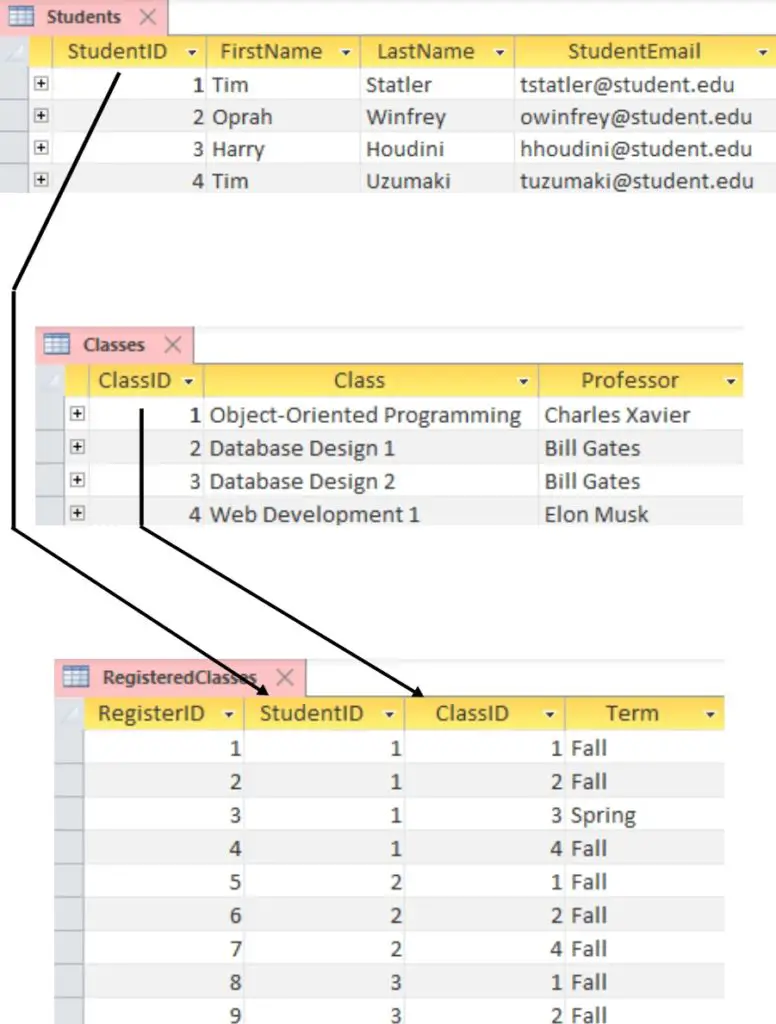
Data lives in tables linked by keys, as above, and you query it with SQL. Proposed by Edgar F. Codd at IBM in 1970, it’s the most widely used model by far: PostgreSQL, MySQL, SQLite, Oracle and SQL Server are all relational.
Hierarchical model
Data forms a tree: each record has exactly one parent, like folders on a disk. It was common on mainframes from the 1960s, with IBM’s IMS the best-known example, and the idea lives on in file systems and formats like XML and JSON. Its weakness is that data with more than one parent, such as a student in several courses, has to be duplicated.

Network model
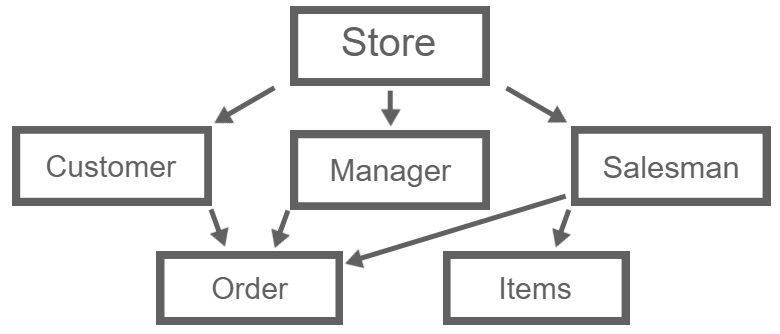
An extension of the hierarchical model where a record can have several parents, forming a graph rather than a tree. It handled many-to-many relationships before relational databases took over.
Object-oriented model
Stores data as objects, the same way object-oriented languages like Java model it, with attributes and methods. Pure object databases stayed niche; instead, object-relational mappers (ORMs) such as Hibernate and Django’s ORM let you work with objects in code while storing them in a relational database.

NoSQL models
“NoSQL” covers several non-relational models that grew popular with large web applications: document databases such as MongoDB store JSON-like documents, key-value stores such as Redis act like a giant hash table, and graph databases such as Neo4j store highly connected data, a modern take on the network model.
Where the entity-relationship model fits
The entity-relationship (ER) model isn’t a way to store data. It’s a way to design a database before you build it: you draw the entities (students, courses), their attributes, and the relationships between them in an ER diagram, then turn the diagram into tables. Expect to draw a lot of these in your database course.
Which database model is best?
For most applications, and nearly all coursework, a relational database is the right default. It’s well understood, flexible and enforces data integrity for you. Reach for a NoSQL database when you have a specific reason: data that doesn’t fit tables, massive scale, or relationships that are better modeled as a graph.
To practice, install SQLite or PostgreSQL and build a small database for something you know well, like your class schedule or a game collection. For more on how databases fit into building applications, see front end vs back end, and for SQL’s place among programming languages, programming language levels.
